

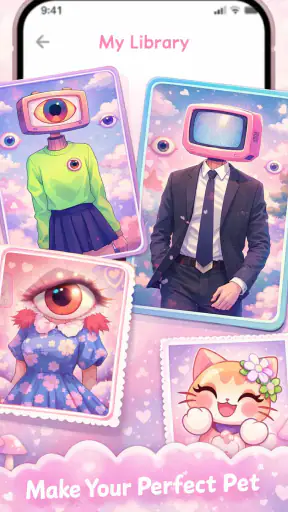
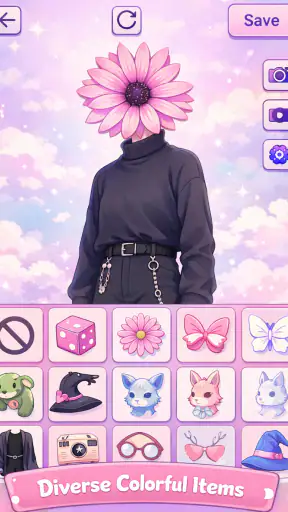
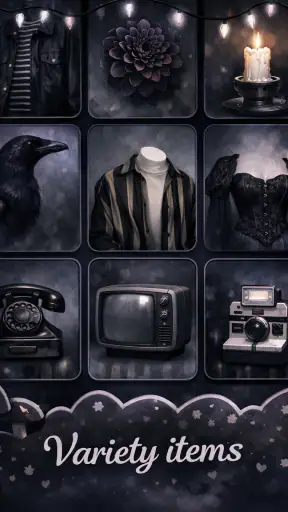
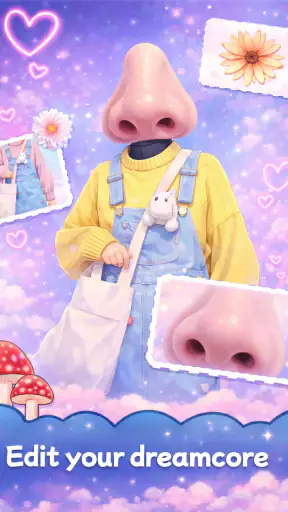
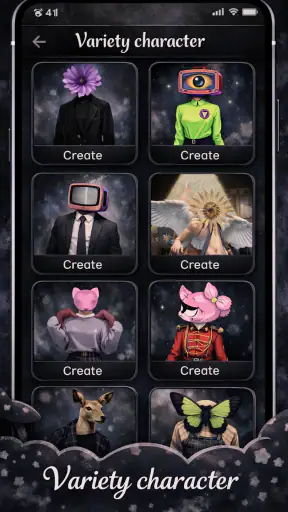
I approached Dreamcore & Weirdcore Maker as a quick creative tool rather than a full illustration studio, and that distinction matters. Its purpose is to help me build dreamy, strange, fantasy-style avatars without starting with a blank canvas in a traditional drawing app. The experience fits people who want an unusual profile image, a mood-board character, or a visual experiment they can finish in a short sitting.
The app sits in the Art & Design category and is developed by Revivoskin. It is free to use, rated for Everyone, and works on Android devices running version 7.0 or later. The current release is version 1.0.9, while its broad reach of over a million installs suggests that the concept has found an audience beyond a small niche. Still, its average rating of 3.0 from around a thousand ratings tells me to keep expectations realistic: this is an accessible idea with clear appeal, but not a polished replacement for a professional design suite.
How I use it from a blank start to a finished avatar
My most reliable workflow begins with a purpose, not with random tapping. Before opening the editor, I decide whether I want a soft dreamcore image, an unsettling weirdcore character, or something in between. That small decision keeps the result coherent. If I choose every option only because it looks interesting on its own, the final avatar can become visually noisy very quickly.
I then build the character in broad stages. I start with the main visual identity, choose the overall mood, and only afterward worry about details. This order is more useful than trying to perfect one small element immediately. A pale, surreal character and a darker, distorted character need different supporting choices, so locking the atmosphere first helps me avoid reworking the whole image.
The app is especially approachable if I do not think of it as drawing pixel by pixel. Instead, I treat it as a guided composition tool for assembling a recognizable fantasy avatar. That makes it suitable for someone who wants a result quickly, including users who do not feel confident with sketching, coloring, or anatomy.
A practical everyday example is creating a new profile picture for a messaging account. I can spend a few minutes exploring a character concept, keep the design simple enough to remain readable in a small circular crop, and then use the finished image outside the app. For that purpose, an expressive face and a strong silhouette matter more than filling every available area with decoration.
For a mood-board project, I use a different approach. I create several related avatars instead of trying to make one perfect image. I keep the central mood consistent and change one visual idea at a time. This produces a small family of images that feels intentional, and it also makes it easier to identify which choices actually improve the style.
Why the first few choices matter more than the last few
In this kind of maker app, early decisions establish the visual language. A strong central theme can make a simple avatar feel finished, while too many competing details can make a more elaborate one feel unfinished. I therefore check the image at a small size before continuing. If the character is difficult to recognize when viewed as a thumbnail, adding more decoration usually will not solve the real problem.
The most useful habit is to judge the avatar as a small image before polishing it. This is easy to overlook because the editor invites close inspection. A design that looks exciting while zoomed in may lose its expression, contrast, or focal point when used as a profile image.
I also save my strongest direction mentally before experimenting. If a later change makes the result worse, I can return to the earlier idea rather than continuing to adjust blindly. This simple stop-and-check rhythm makes the app feel less random and gives each session a clear purpose.
Settings and choices worth checking before committing
The most important settings are the ones that affect how the final image will be used. I think about the intended destination first: a profile picture, a character reference, a social post, or a private experiment. A profile image needs a clear face and readable outline. A larger creative composition can tolerate more subtle details and unusual spacing.
I also check the balance between the character and the surrounding visual mood. A background or atmospheric element should support the avatar rather than compete with it. When the subject blends into the surroundings, the image can look attractive in the editor but weak in practical use. I prefer making one element dominant and letting the others act as support.
Color choices deserve a deliberate pass. Dreamcore designs can become too pale and lose definition, while weirdcore designs can become so intense that the character’s expression disappears. I usually select the mood first, then adjust contrast by choosing a clearer separation between the subject and its surroundings. This is more effective than simply adding brighter or darker elements everywhere.
Another useful check is visual consistency. If one part of the avatar suggests a gentle fantasy style and another suggests a completely different mood, the result may feel accidental. That contrast can work when it is intentional, but I ask myself whether it communicates a story or merely reflects the order in which I tapped options.
Repeatable habits that make sessions faster
Experienced use is less about discovering a secret button and more about repeating a sensible sequence. I begin with a rough concept, establish the main character, test the image at its likely display size, and only then refine the supporting choices. That pattern reduces the time spent polishing designs that were never going to work.
I find it helpful to create variations in batches. Instead of changing five things at once, I keep most of the design stable and alter one category of choice. For example, I might preserve the character identity while testing a softer atmosphere, then return to the stronger version if the change weakens the image. This gives me a clearer sense of cause and effect.
Batching also helps when I am undecided between dreamcore and weirdcore. I can create one restrained version and one more unsettling version from the same starting idea. Comparing them side by side is more useful than judging each one in isolation because the differences become obvious.
Another time-saving pattern is to stop when the image has a clear focal point. More options do not automatically mean more personality. If the face, silhouette, and mood already work together, extra additions may dilute the concept. I would rather keep a deliberately simple avatar than create a crowded image that is difficult to read.
For repeat projects, I use a small personal checklist: recognizable subject, consistent mood, readable at thumbnail size, and no unnecessary visual competition. The checklist is not a feature of the app; it is a way of working that makes the app more dependable. It also helps me compare different creations without relying only on the excitement of the latest result.
Where this app is stronger than usual alternatives
The main advantage over a conventional drawing app is the lower starting barrier. A blank canvas asks me to supply the entire concept, while this maker format encourages experimentation with a specific visual identity. Someone who wants a fantasy avatar but does not want to learn layers, brushes, anatomy, or color theory can get moving much sooner.
It is also more focused than a general photo editor. A photo editor may offer filters and adjustments, but it does not necessarily help shape a character concept. Here, the appeal comes from making an original-looking avatar rather than applying a mood to an existing photograph.
Compared with a professional illustration tool, however, the trade-off is control. A full drawing application is better when I need precise anatomy, custom lettering, exact composition, detailed retouching, or a repeatable commercial style. It can take longer to learn, but that extra complexity is valuable for serious design work.
Compared with a generic avatar builder, this app has a more distinctive artistic direction. A standard avatar creator often aims for clean, familiar, or social-friendly characters. This one is better suited to people who specifically want dreamy, surreal, unusual, or slightly unsettling results. If I want a conventional cartoon portrait, another tool may be faster and more appropriate.
Limits that become clearer with advanced use
The same focus that makes the app approachable can feel restrictive after repeated sessions. Once I have explored the central style, I may want more precise control over individual visual relationships. That is where a dedicated design tool becomes more attractive. The app works best when I accept its guided creative boundaries instead of expecting unrestricted illustration control.
There is also a difference between making one appealing avatar and building a consistent collection. A single image can succeed through mood and novelty. A set of character images needs stronger discipline: similar proportions, related color logic, and a repeatable visual structure. I can develop habits to improve consistency, but a specialized illustration workflow is usually better for maintaining exact standards across many assets.
Users who need advanced export preparation should think carefully about their workflow. An avatar intended for casual sharing has different requirements from artwork prepared for printing, branding, or professional delivery. I would use this app for concept development and personal images, then move to another tool when exact technical preparation becomes central.
The rating profile reinforces that balanced view. With an average of 3.0 from roughly a thousand ratings and about sixty reviews, the public response is neither a clear endorsement nor a warning to avoid it entirely. I read that as a sign that the experience can be enjoyable when it matches the user’s expectations, but frustration is possible for people looking for deeper controls or a more refined creative pipeline.
Who should try it, and who should choose something else
I would recommend it to anyone who enjoys dreamcore or weirdcore aesthetics and wants a quick way to explore avatar ideas. It is a good fit for profile images, casual character concepts, visual journaling, and mood-driven experimentation. It also makes sense for younger users and beginners because its Everyone content rating and straightforward creative premise make it less intimidating than a professional art package.
It is particularly useful when the goal is exploration rather than technical perfection. If I am unsure what kind of character I want, a focused maker app can help me discover a direction before I invest time in detailed drawing. That makes it a practical first step, even if I later finish the concept elsewhere.
I would skip it if I need exact control over every line, a highly consistent character series, professional typography, or a carefully prepared print asset. I would also choose another option if my main interest is editing real photos rather than creating fantasy avatars. The app’s value depends heavily on wanting this specific kind of visual creation.
What I would do before sharing the result
Before using an avatar publicly, I inspect it in the context where it will appear. I check the small preview, look for details that disappear against the background, and make sure the central expression still communicates the intended mood. An unsettling design can be fun, but if it becomes unreadable at a small size, it has missed the practical purpose of a profile image.
I also make a clean final version rather than repeatedly modifying the only copy. Keeping a preferred variation separate from experiments prevents an accidental change from replacing the design I actually liked. This is a basic habit, but it matters when the creative process depends on trying many alternatives.
For a personal collection, I label the images by concept in my own storage rather than relying on memory. I might group them by soft dreamcore, surreal fantasy, or darker weirdcore mood. This turns a series of disconnected experiments into a usable reference library and makes future sessions faster because I can identify which direction I want to revisit.
Privacy and sharing decisions should also be personal and deliberate. An image may feel harmless, but a profile avatar can still become part of a public identity. I prefer reviewing the final image as a stranger might see it, especially when the design includes unusual symbols, intense expressions, or a deliberately eerie atmosphere.
My verdict after settling into the workflow
Dreamcore & Weirdcore Maker succeeds when I use it as a focused idea generator and avatar creator, not as a complete art workstation. Its free price removes the biggest barrier to trying the style, and its clear artistic direction gives beginners somewhere to start. The fact that it has passed a million installs also shows that the concept is easy for many people to understand and try.
My recommendation comes with a condition: approach it with a specific use case and modest expectations. For a quick fantasy profile image or a strange character experiment, it can be enjoyable and productive. For professional illustration, exact repeatability, or advanced editing, I would move to a more capable alternative.
The best results come from combining a clear mood, a readable silhouette, controlled experimentation, and a final thumbnail check. Those habits do more for the quality of the finished avatar than endlessly adding details. If that kind of guided creativity sounds appealing, this is a worthwhile free app to explore. If you want complete artistic freedom from the first stroke to the final export, its limitations will become apparent sooner.


